
File Attack Deep Dives: PDF URL Actions
How PDF OpenAction, Launch, URI, JavaScript, and embedded-file actions turn a document into a click — and the action audit that catches them.
A PDF is a program with a paper costume: a few small dictionary keys decide whether opening the file also opens a browser tab, launches a file, runs script, or waits for one click. Catch it by auditing the actions before trusting the page.
Part 4 of this series, ICS calendar invites, showed an invite that renders a phishing link on the victim's own calendar. PDF URL actions are the quieter sibling: no macro project, no script the scanner can flag, just a document-level instruction that tells the viewer what to do when the file opens. This part opens up that family: the keys, every way they fire, and the action audit that catches them.
The keys
PDF defines its interactivity as actions attached to triggers. Adobe's action
reference lists the types plainly: Launch launches an application or file,
URI resolves a uniform resource identifier, and a document can execute an
action automatically when it is opened
(action types,
automatic open behavior).
Adobe's end-user docs say the same thing from the other side: triggers control
when actions run, and page opening is one of those triggers
(triggers).
A handful of keys carry almost the whole attack surface.
/OpenAction: the auto-fire trigger. /OpenAction lives in the document
catalog and names the action that runs when the document opens. Setting it to
a JavaScript action is the textbook way to run script on open
(OpenAction to JavaScript),
but it can equally point at a /URI action, which is what makes a
no-click phish possible. Minimal shape:
1 0 obj
<< /Type /Catalog
   /Pages 2 0 R
   /OpenAction << /S /URI /URI (https://login-example.invalid/view) >>
>>
endobj
The scanner sees a valid catalog with a valid action. The victim sees a document open and a browser tab follow it.
/URI: the link resolver. A /URI action resolves a URL, and the common
carrier is a link annotation: a clickable rectangle (/Rect) over part of the
page whose /A dictionary holds the /URI target
(annotated URI example). Minimal shape:
19 0 obj
<< /Type /Annot /Subtype /Link /Rect [100 500 300 520]
   /A << /S /URI /Type /Action /URI (https://login-example.invalid/doc) >>
>>
endobj
Unlike /OpenAction, this one waits for a click, which is why the page around
it is always social engineering: a blurred invoice, a "view full document"
button, a fake login prompt.
/Launch: the file launcher. A /Launch action launches an arbitrary
application or document named by its file keys, and on Windows the viewer
hands the target to ShellExecute
(Launch actions).
Minimal shape:
20 0 obj
<< /S /Launch /F (report.cmd) /P (/c hidden-step) >>
endobj
Modern viewers typically gate this behind a warning prompt, so attackers pair it with lure text that talks the victim through the click. The payload is not the PDF; the PDF is the finger that pulls the trigger.
Those three keys are the core, and three more complete the surface: a
JavaScript action (/JS) that runs script on open or on an event, an
embedded file (/EmbeddedFile) that hides a payload inside the document,
and form submission actions that POST whatever the victim types to an
attacker URL.
Why gateways miss it
Classic controls look for malware in the file: a bad hash, an executable, a script. A URL-action PDF carries none of those, so there is nothing to match.
The cleanest demonstration arrived in April 2026. Attackers sent a
document-sharing lure through SparkPost with passing SPF, DKIM, and DMARC, and
the attached PDF was 46 kilobytes with no macros, no embedded JavaScript, and
no executable payload. Every static measure called it clean, and technically
it was: the file contained an /OpenAction directive that launched a
Render-hosted phishing URL the moment anyone opened it, with no click required
(OpenAction phishing case).
Static analysis sees a valid document action; it does not open the file and
watch what happens next, and that gap is where the attack lives.
The click-to-open variant is even cheaper. SANS documented single-page PDFs
carrying one clickable /Annot zone that linked out to a staged ZIP, scoring
as low as 6/60 on VirusTotal, and published a YARA rule keyed on exactly that
shape: one page, fewer than three annotations, a link subtype, an action, a
/URI, and a /Rect
(malicious Annot delivery). A PDF with a
little social engineering remains a reliable delivery mechanism precisely
because the malicious content is not in the file at all.
A final wrinkle favors the attacker: viewers disagree. Most PDFs today render in the operating system or the browser, where many dynamic features do not work out of the box, while the same file in a full reader may execute the action as written (reader behavior gap). Attackers aim at the readers their victims use, so the file that looks inert in your preview pane may behave differently on the target's desktop.
What it looks like to an audit
The whole class reduces to a few keys you can read without rendering the page. A structure-first pass answers most of the question in seconds:
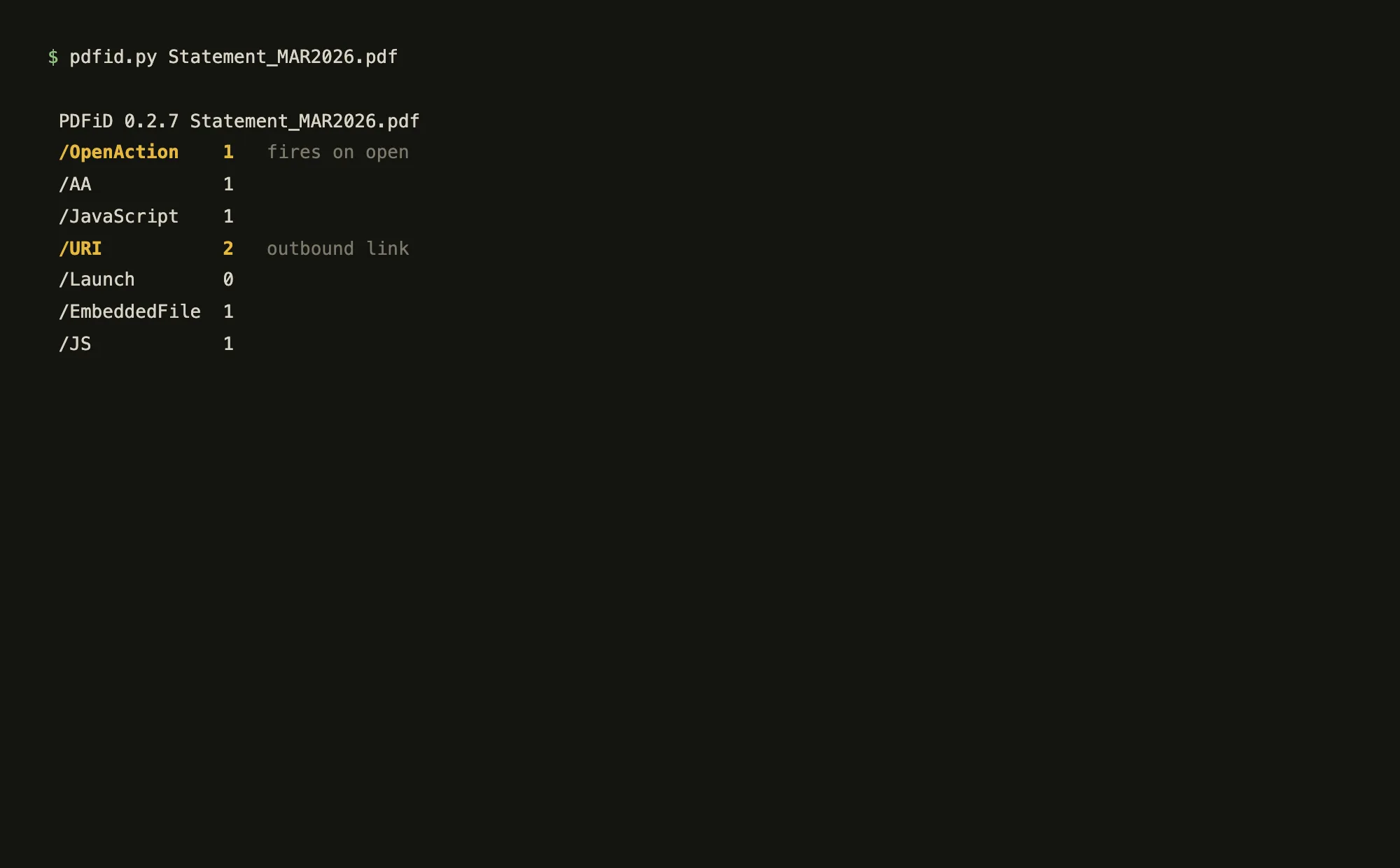
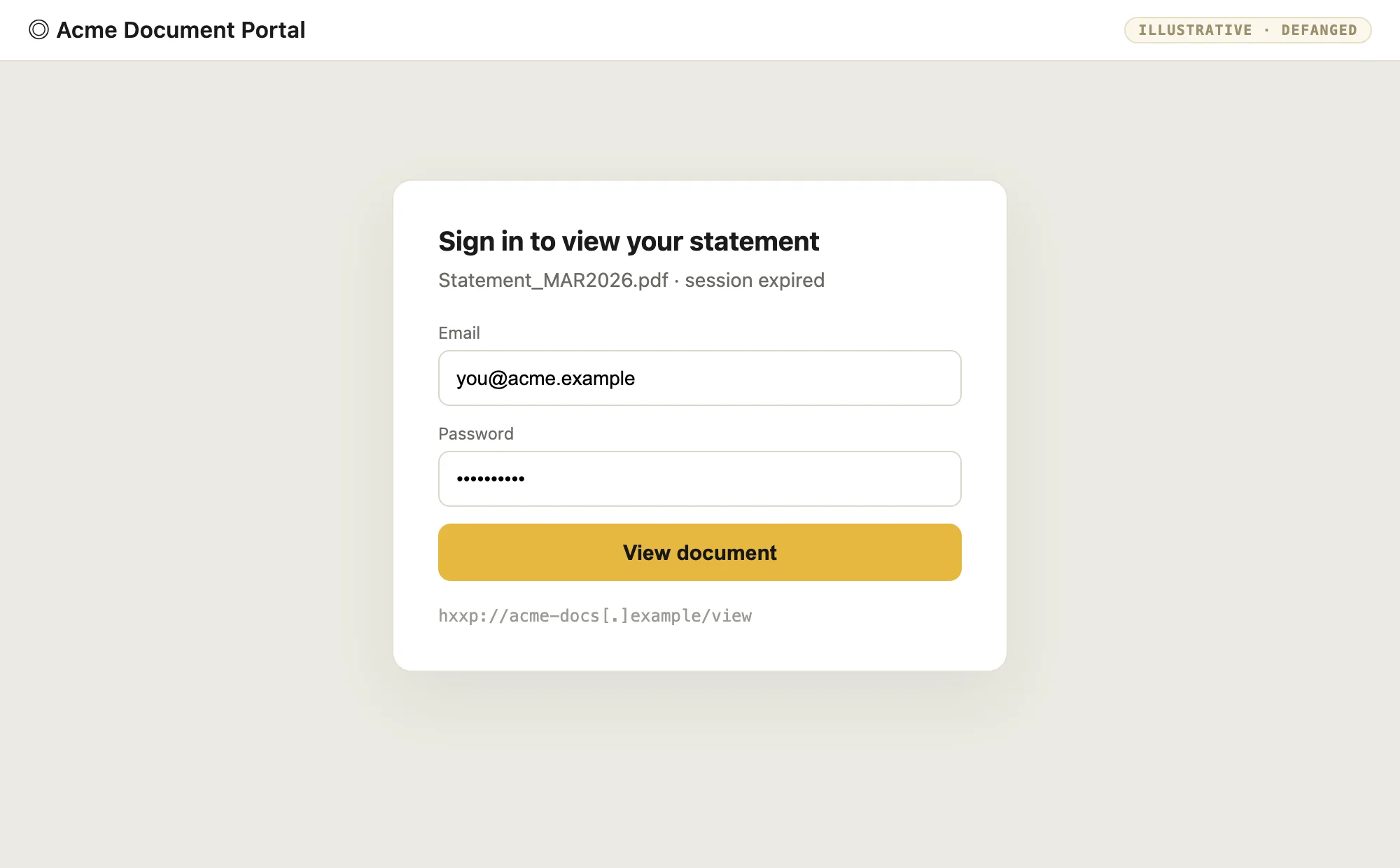
/OpenAction and outbound /URI are the finding, whatever the document shows.And when the action fires, the payload is a page — the same phishing shape the HTML deep dive covered, reached from a document instead of a link.
Detection tells
Detection has two halves: parse the structure without opening the file, then audit every action the parse surfaces. Work through these in order of signal quality.
- An
/OpenActionin the catalog. Any automatic action on open is the highest-value static signal because it answers whether the file acts without a click. Juniper's IPS signature for this exact parameter exists because attackers use it to run script the moment a user reads the file, with known cases reaching remote arbitrary code execution (PDF-OPENACTION signature). Flag the key first, read the target second. /Launch,/JavaScript,/AA, and embedded-file keys alongside it. The classic suspicious-keyword set (/JS,/JavaScript,/AA,/OpenAction,/Launch,/URI,/EmbeddedFile) earns its reputation as a combination: an automatic action plus script is very suspicious, while either alone may be benign. Enumerate all of them before judging any one.- Link annotations with external targets.
/Annotplus/Subtype /Linkplus a/URIoutside the organization's own domains, especially on a one-page document with almost no text. The SANS YARA rule above is the executable version of this check. - The rendered lure around the link. A blurred first page, a single large button, or "click to view full document" text over the one clickable rect. The lure is part of the indicator: a bare link with no surrounding document is a different object from a bare link dressed as an invoice.
- Behavior after open. Detonate with the viewer the victims actually use and watch for the follow-on: a browser tab to a fresh domain, mapped as spearphishing attachment turning into user execution of a malicious link (T1566.001, T1204.001). A document open that immediately becomes network activity is the verdict that survives every obfuscation of the URI string.
Step through a document that looks inert and watch the viewer obey it:
A PDF URL action, end to end
Statement_MAR2026.pdfPick a pattern below, see how it lands, then reveal the tell and the detection.
OpenAction to URI (no click)
How it lands. The catalog's /OpenAction points at a /URI action, so opening the document navigates to a phishing or malware URL with no user click at all.
What to do about it
The fix follows the tell. Parse every inbound PDF before rendering: dump the
catalog for /OpenAction, enumerate annotations for /URI targets, and flag
any /Launch on sight. Reputation-check extracted URLs against threat intel
rather than trusting the file's clean static verdict. Detonate in the viewer
your users actually run, watching for the open-becomes-network-request pair,
and disable JavaScript execution in readers where the business allows it. The
IronScales case is the policy argument: authentication passed, static scanning
passed, and only behavioral analysis at the attachment level would have caught
the file's /OpenAction before delivery.
Does disabling JavaScript in the reader stop PDF URL attacks?
Partly. It neuters the script-carrying variants, which is worth doing on its
own. But a pure /OpenAction to /URI phish needs no script at all, so URL
extraction and reputation checks still have to run on every inbound PDF.
Why not just block every PDF with an action?
Because legitimate documents use actions constantly: tables of contents, cross-references, and form submissions are all actions. Alert on automatic open triggers and external targets, not on the mere presence of interactivity.
Is the Click-to-open PDF more or less dangerous than the no-click one?
Less reach, more signal. A link annotation needs a click, so it depends on
lures and leaves a clickable rect to find. An /OpenAction needs nothing and
looks like a clean file, which is exactly why the audit has to run on every
PDF, not only the ones that look suspicious.
Test yourself
A quick self-check on PDF URL actions. Pick an option to see the answer.
1. Which key makes a PDF act the moment it opens, with no click?
2. Which finding best survives URI-string obfuscation?
3. A PDF has no script and no macro but still acts on open. What is carrying the action?
4. Why is an embedded-file key worth flagging on its own?
What to remember
- PDF behaviour is dictionary keys, not page content:
/OpenActiondecides whether the file acts on open, and/URI,/Launch,/JS,/EmbeddedFile, and form actions decide what it does. - The malicious content is usually not in the file, so static "clean" means little until you have audited the actions and followed the target.
- The verdict that survives obfuscation is behavioral: a document open that becomes a browser tab, a launched process, or an outbound POST.
Explore next:
- PDF-lite — open a PDF's structure and inspect its objects locally.
- ICS calendar invites — the previous deep dive, where the click is dressed as a calendar invitation instead of a document.
- HTML as an attack surface — where all the pages these actions open are built.
Useful references:
- Actions and Destinations, Adobe Acrobat SDK
- PDF actions and triggers, Adobe Acrobat help
- Automatic action on document open, Adobe API reference
- Setting OpenAction to a JavaScript action, Datalogics
- Malicious PDF Annot delivery, SANS Internet Storm Center
- OpenAction phishing that passed every scanner, IRONSCALES
- PDF-OPENACTION IPS signature, Juniper
- Spearphishing Attachment, T1566.001
- User Execution: Malicious Link, T1204.001