File Attack Deep Dives: Office Documents as an Attack Surface
Every way an Office document attacks: macros, remote templates, embedded objects, hyperlinks, QR handoffs and invoice fraud, plus the signals that catch each.
A document is a container that can carry code, but it does not need any. The same file can deliver a click, a phone handoff, or a payment request with no macro and no executable at all. Read the structure, then read the intent.
Part 2 of this series, HTML as an attack surface, covered the one file type that is also a program. Office documents are the opposite problem: the container is ordinary, and the attack lives either in a hidden binary part or in the words and links on the page. This part covers both. First the code, so you know where a macro hides and every way it fires. Then the documents that carry no code at all, because those are the ones a macro policy never touches.
Where does the code hide?
The VBA project lives in one opaque binary part, and its path depends on the host:
- Word:
word/vbaProject.bin - Excel:
xl/vbaProject.bin - PowerPoint:
ppt/vbaProject.bin
A modern macro-enabled document (.docm, .xlsm, .pptm) is a ZIP archive
of XML parts. Rename a copy to .zip, extract it, and every part is readable
XML except one: the VBA project blob.
Inside that blob sits an OLE compound file holding the compressed VBA source
plus a per-version compiled cache, with a dir stream describing the project
and one stream per code module.
Three markers confirm a package really carries a project: the vbaProject.bin
part itself, a macroEnabled.12 content type in [Content_Types].xml, and a
vbaProject relationship wiring the workbook to the blob. A plain .xlsx has
none of these, which is why saving an .xlsm down to .xlsx strips the code.
Legacy .doc and .xls files skip the ZIP layer entirely: the whole file is
the compound document, and the VBA lives in Macros/VBA or
_VBA_PROJECT_CUR/VBA storages.
Analyst tooling reads this layout directly. oledump.py lists the compound
streams and flags macro-bearing ones with a capital M, while olevba extracts
and deobfuscates the source without opening the document. A structure-first
triage, stream list before source read, tells you in seconds whether there is
anything to detonate at all.
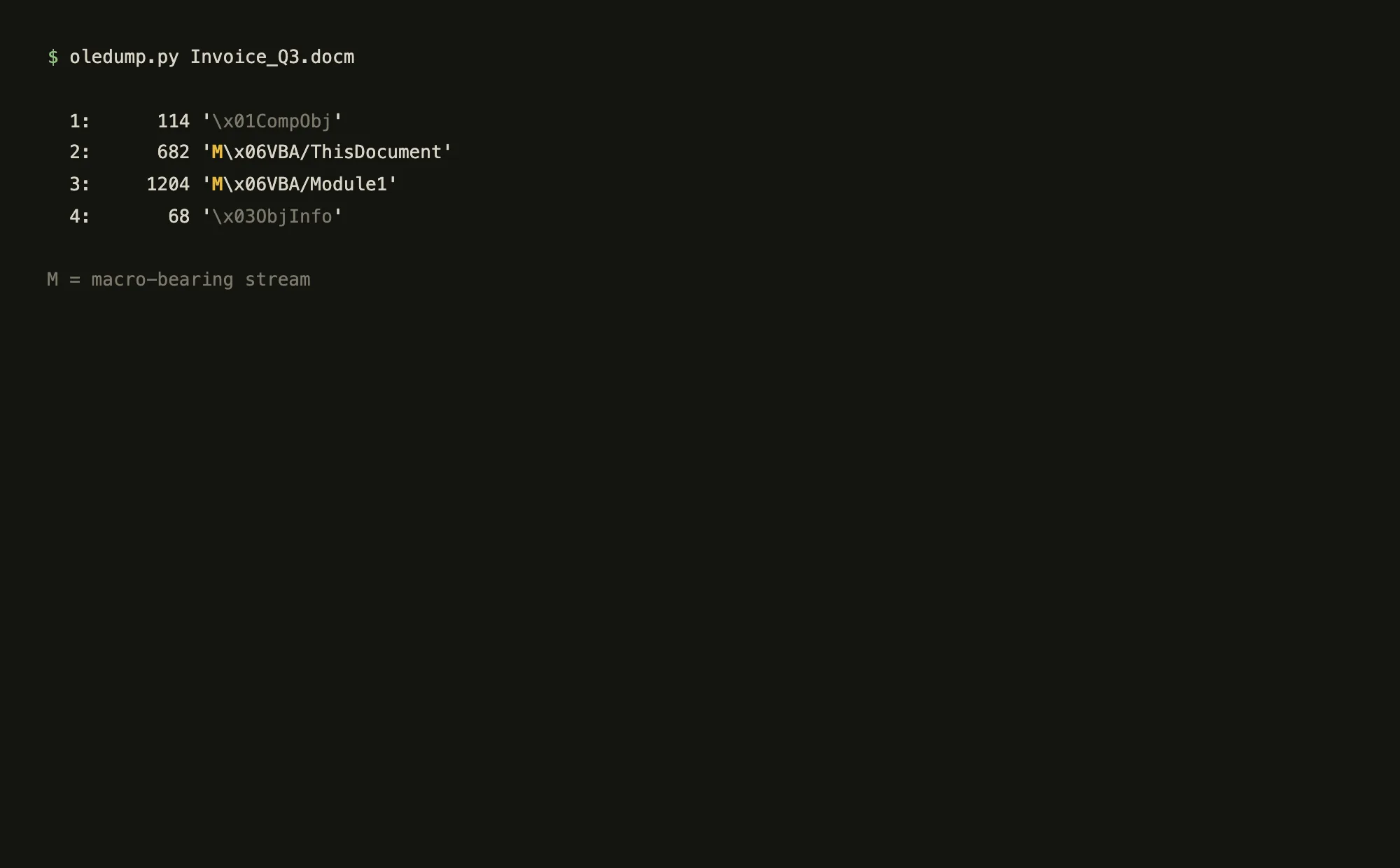
M) sit inside an otherwise ordinary document.Which procedure names fire it?
These names are the switch. If one appears in the project, the code runs on open. Before reading a single line of VBA, an analyst asks whether anything runs automatically, and the triggers fall into three groups, matched case-insensitively:
- The legacy Auto family, inherited from Word 6:
AutoOpen,AutoClose,AutoExec,AutoExit,AutoNew. - Word object-model handlers:
Document_Open,Document_Close,Document_New,Document_BeforeClose,Document_BeforeSave. - Excel object-model handlers:
Workbook_Open,Workbook_Close,Workbook_Activate,Workbook_BeforeClose,Workbook_BeforeSave.
This is the moment the whole class turns on: a normal-looking invoice, one yellow bar, one click. Everything after that is the application obeying the file.
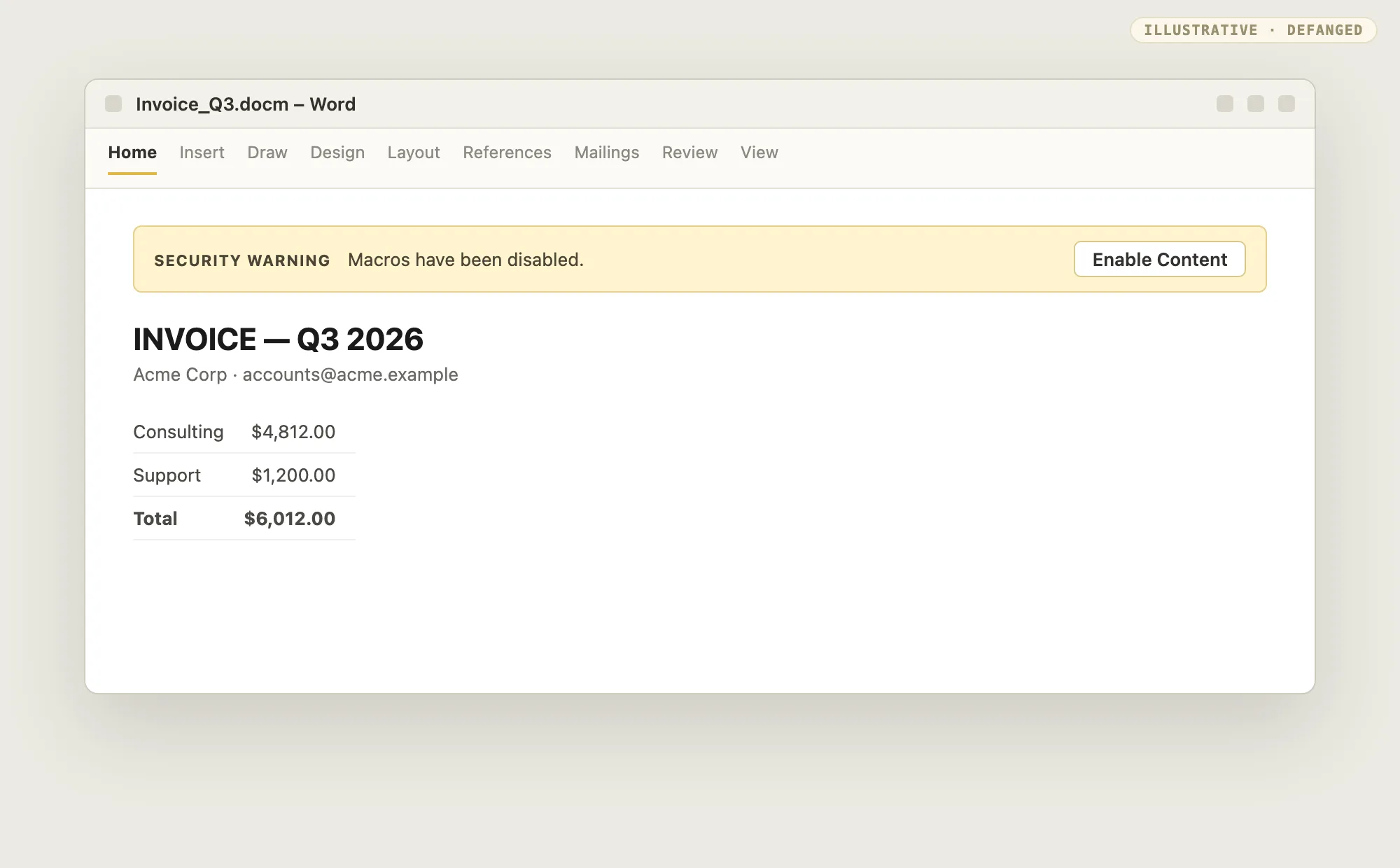
A single line in Document_Open calling Shell is a different threat from a
long sophisticated macro with no automatic trigger. But the absence of an
auto-exec name is not a clean bill of health: documents pair triggerless
macros with "enable content" social engineering, or with remote template
injection, where an attachedTemplate relationship points at an external
.dotm that carries the real code.
Two structural evasions deserve their own checks. VBA stomping exploits the compiled cache: Excel may run the per-version P-code without recompiling the visible source, so the code you read is not the code that runs. Detection compares the P-code disassembly against the source and flags divergence. XLM 4.0 macros, the pre-VBA Excel language, hide in concealed sheets and are missed outright by VBA-only parsers, so sheet inspection belongs in the triage alongside stream inspection. And macros are not even required: DDE (Dynamic Data Exchange) fields can launch a command from a code-free document when the user accepts a prompt.
Step through the sequence and watch the gap open between what a control sees and what the machine actually does:
A macro document, end to end
Invoice_Q3.docmWhat if the document carries no code at all?
Blocking macros closes one door and leaves the rest of the building open. Every vector below is a normal document doing something a document is supposed to do, which is exactly why inspection has nothing to flag.
The link is the attack
The document is a pretext: a "protected document", an unpaid invoice, a "sign to receive" notice. It wants one click, and the link lands on a credential page or a payload. It is an old trick, and it exists precisely to get past attachment scanners, which inspect the file rather than where a link leads. Proofpoint still sees it at scale: in 2024 it documented a campaign that put the links inside PDF attachments (TA450).
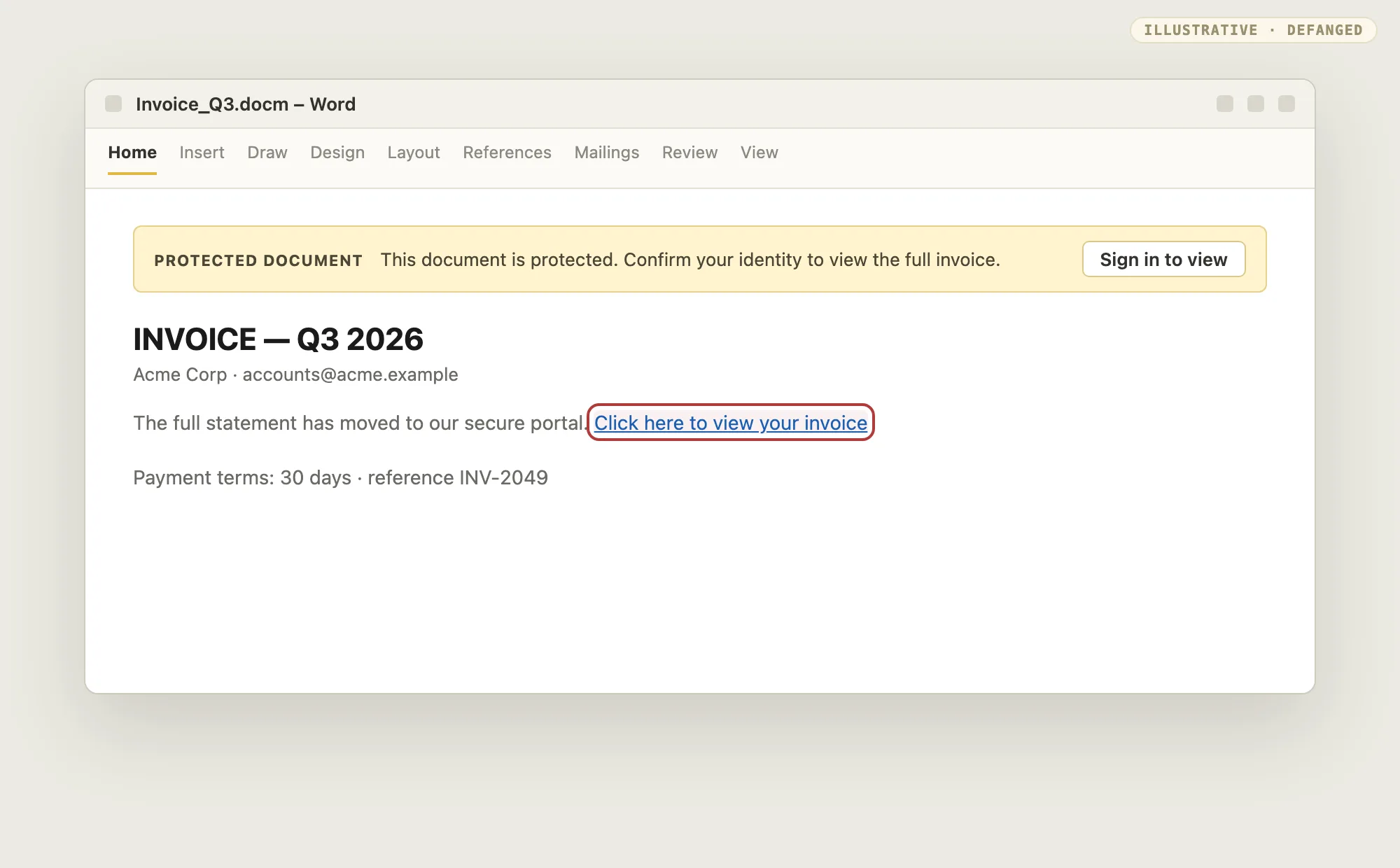
- Tell: a document whose only value is one link; a "sign in to view" banner on a file nobody asked for; link text that disagrees with the real target.
- Detection: resolve every URL in the document, including the ones hidden behind display text, and treat a document that demands credentials as a phishing artifact rather than a file to detonate.
A QR code leaves your network
Put the link in a picture. A QR code is an image, so text scanners walk past it, and the person who scans it is on a phone that sits outside the proxy, the logging, and often the managed device. It is the same handoff Part 2 describes for HTML pages, moved into a document, and it is why "scan this to verify" has become a standard lure.
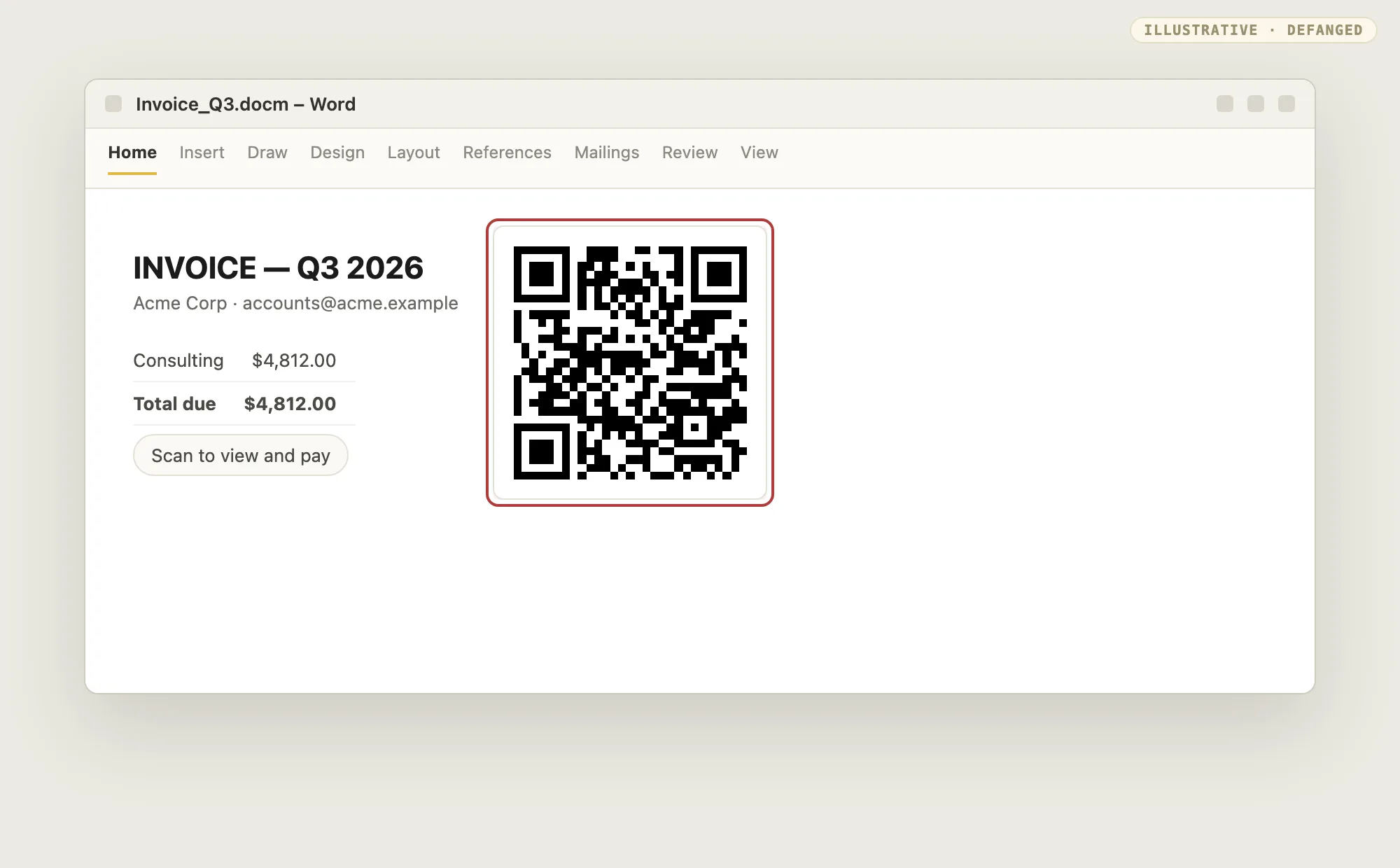
- Tell: a QR code inside a document, especially beside "scan to pay" or "scan to verify", or a document that asks the reader to continue on a phone.
- Detection: decode every QR image in the document and score the target. Use the QR workbench to see what a scanner would follow.
The invoice itself is the attack
Here nothing executes and nothing is clicked. The document is a financial request with a plausible story and a new bank account, and the transfer is the payload. That is business email compromise: impersonation in service of financial theft. The FBI's IC3 described the pattern in its BEC advisory, and it remains one of the costliest categories in its annual report.
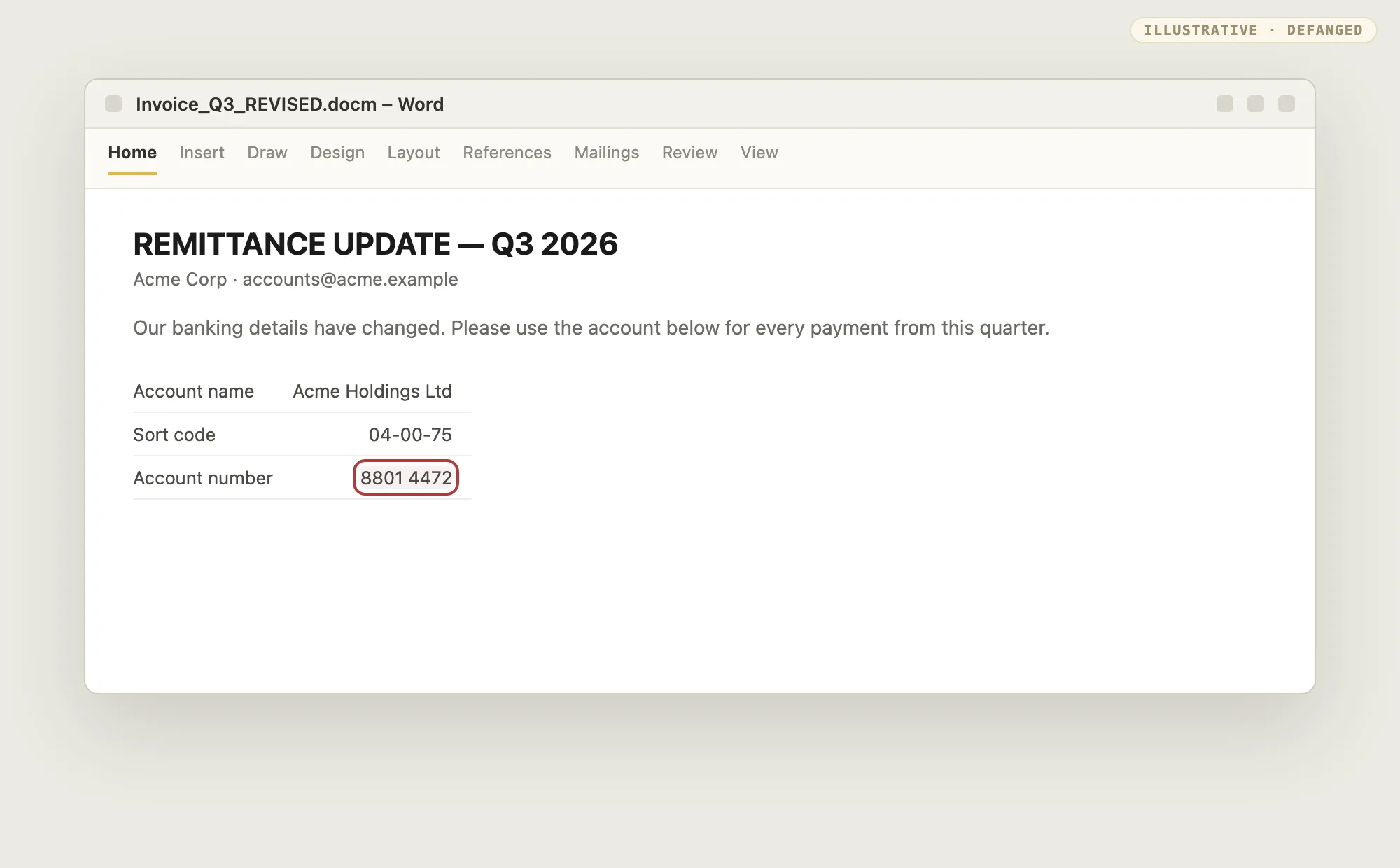
- Tell: a payment instruction that arrives as an attachment; a change of bank details, especially mid-thread or close to a deadline; a domain that is brand-adjacent rather than the one you pay every month.
- Detection: process, not signature. Confirm banking changes on a number you already hold, and require a second person to approve a change of payee.
An embedded object runs on double-click
A document can carry another file inside it, dressed as an innocent icon. The embedded object can be a script, a package, or an executable, and opening it runs the content rather than the container. That makes it a proxy-execution problem as much as a document problem.
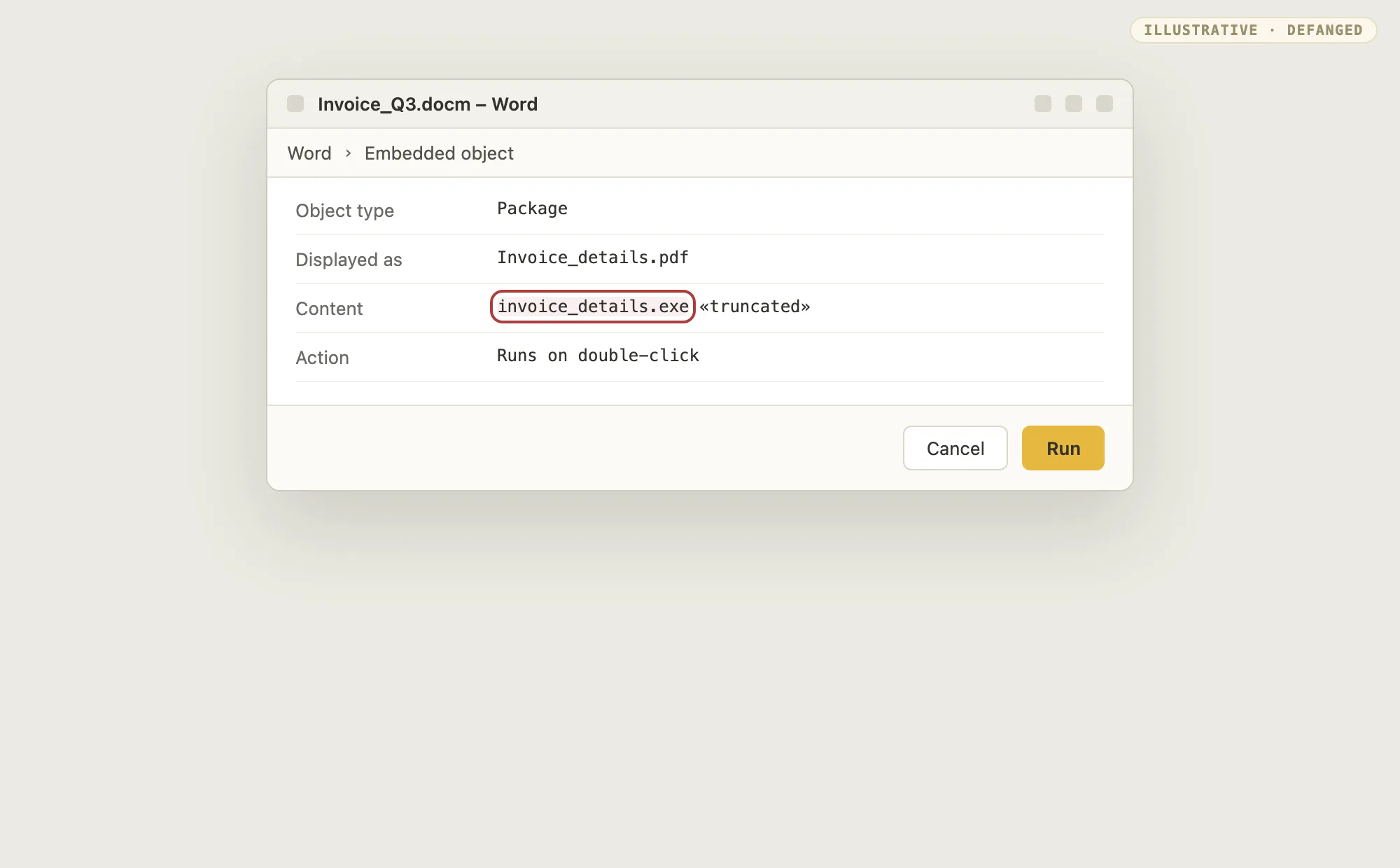
- Tell: an embedded object whose display name disagrees with its content type; a document that asks the reader to double-click an icon to "view the details".
- Detection: enumerate embedded objects, compare the declared type against the real one, and treat a mismatch as malicious.
Why do gateways miss it?
Because nothing dangerous is visible at the point of inspection. A dormant macro is inert until consent, and a code-free lure is only text. Classic controls look for a known macro hash or flag any macro at all. Both fail the same way: attackers build low-volume, per-target documents, so signatures miss, and the generic "enable content" warning still gets clicked by enough people. Obfuscation frameworks widen the gap. Cisco Talos documented MacroPack-generated documents uploaded between May and July 2024 from sources in China, Pakistan, Russia, and the US, each carrying generic "enable content" lures and multi-stage VBA that delivered Havoc, Brute Ratel, and PhantomCore payloads (MacroPack abuse).
This is not theoretical either. In February 2025, SentinelOne researchers described a Ghostwriter campaign, prepared since mid-2024 and active by November, that sent RAR archives via Google Drive containing Excel workbooks with Macropack-obfuscated macros. Enabling content wrote a DLL that staged PicassoLoader while a decoy workbook held the victim's attention (Ghostwriter campaign).
The pattern across both campaigns is the point: per-sample builds defeat hashes, layered obfuscation defeats strings, and the human click defeats the rest.
What are the detection tells?
Structure before detonation, behavior after. Work through these in order of signal quality.
- Macro project presence. The
vbaProject.binpart path, themacroEnabledcontent type, and thevbaProjectrelationship, confirmed with anoledump-style stream list showing capital-Mmacro streams. No project means no macro; a project in a document that should be code-free is itself the finding. - Auto-exec entry point. One of the Auto,
Document_*, orWorkbook_*names in the deobfuscated source. This is the highest-value static signal because it answers whether the code fires on open. - External template relationship. An
attachedTemplatetarget in the.relsfiles pointing off-host, when the delivered document carries no macro of its own. The code is still to come. - XLM and concealed sheets. Excel 4.0 macro sheets hidden behind concealed or very-hidden visibility, which VBA-only parsers skip entirely.
- Suspicious primitives in the source.
Shell()andCreateObject("WScript.Shell"), download pairs likeMSXML2.XMLHTTPwithADODB.Stream,URLDownloadToFile, and PowerShell invocations with encoded or hidden flags. Real-world droppers follow this shape: create an HTTP object, download a file, decode it, and execute it hidden. - P-code versus source divergence. A stomping check comparing compiled cache against visible source. Divergence means the source review is fiction; treat the sample as malicious until the cache is understood.
- Office spawning a script host. The behavioral pair that survives every
obfuscator:
WINWORD.EXEorEXCEL.EXEspawning PowerShell,cmd,wscript/cscript,mshta, ormsiexec, followed by file writes and network connections. The Office process has to spawn the interpreter either way, and that is the part obfuscation cannot change. - Sandbox-evasion checks in the code. Conditions that bail out under analysis: a single logical CPU, disk under 60GB, memory under 1GB, a bare username, watchlisted analysis processes, or a near-empty recent-files list. Talos found exactly this checklist gating a MacroPack second stage. Evasion logic is itself a verdict: benign macros do not probe for debuggers.
- A document with no code that still wants something. A link, a QR code, a
change of bank details, or an embedded object, in a file with no macro project
and no business reason to be there. The absence of
vbaProject.binis not clearance. - A link or QR target that disagrees with its presentation. Display text pointing somewhere else, a QR whose decoded target is a raw IP or a look-alike domain, or a payment page on a domain you do not normally pay.
Pick a pattern below, see how it lands, then reveal the tell and the detection.
Auto-exec VBA
How it lands. A .docm or .xlsm carries VBA in word/vbaProject.bin or xl/vbaProject.bin. On open with content enabled, an AutoOpen or Document_Open entry point runs code that downloads and executes a payload.
How do you defend against it?
The fix follows the tell. Extract and audit macros without opening the document, flag auto-exec entry points before reading bodies, detonate in a sandbox that clicks through "enable content" the way a user would, and alert on the Office-spawns-script-host pair at the endpoint. Block macros in files from the internet where the business allows it. Microsoft blocks them by default now, and that one default removes most of the commodity path (internet macros blocked). Where a business needs macros, the behavioral chain is the backstop that obfuscation cannot move.
For the code-free half there is nothing to detonate, so the controls look different. Resolve every link and QR target at analysis time, put a change-of-bank-details call-back in front of the finance team, and stop treating "no macros" as a verdict. A document with no code can still be the most expensive thing in the inbox.
Does blocking internet macros stop macro attacks?
Mostly, for the commodity path. Documents from the web open under policy that refuses to run the code. But low-volume targeted lures, trusted-sender compromise, and remote template fetches all route around the block, so endpoint behavioral detection still matters.
Why not just alert on every document with a macro?
Because legitimate enterprise workflows run on macros: finance workbooks, reporting templates, and line-of-business forms all carry VBA. Alert on the auto-exec entry point plus suspicious primitives or a suspicious parent-child process chain, not on macro presence alone.
Is a code-free document safe?
No. Remote template injection, XLM macro sheets, and DDE all deliver execution
from a document with no vbaProject.bin, and the vectors above need no code at
all: a link, a QR code, a changed bank account, or an embedded object. Read the
whole structure and the intent, not just the obvious part.
What can a scanner even see in a document with no code?
Text, links, QR images, and embedded objects. Resolve those four and you have covered the code-free half. The work is in following each one to its target, not in finding a signature that will not be there.
Test yourself
A quick self-check on document macros. Pick an option to see the answer.
1. Where does the VBA project live in a modern .xlsm workbook?
2. Which finding best survives macro obfuscation?
3. A .docx arrives with no vbaProject.bin but still wants to run code. What is the likely vector?
4. Why can reading the VBA source mislead you?
5. A .docx arrives with no macro project but asks you to sign in to view it. What is the vector?
6. Why is a QR code inside a document harder to filter than a link?
7. Which control actually stops a fraudulent invoice with changed bank details?
What to remember
- A document is a container, so read the container: the macro project, the relationships, the embedded objects, and the links, before you read the words.
- Execution needs consent, and consent is the attack surface. The code can also arrive later (remote template) or hide elsewhere (XLM, DDE).
- Half of these attacks carry no code at all. A link, a QR code, a changed bank account, or an embedded object needs no macro to work, so a macro policy is not a verdict.
- The signal that survives obfuscation is behavioral: Office spawning a script host, then a download, then a write.
Explore next:
- File attack field guide, part 1: the full taxonomy this series builds on.
- HTML as an attack surface: the previous deep dive, on the file type that is also a program.
- QR workbench: decode a QR code from a document and see where it really points.
- Base64 workbench: decode an obfuscated stage-two string by hand.
Next in this series: PDF URL actions, then LNK and ISO containers, each with its own payload pattern and detection.
Useful references:
- Macros from the internet are blocked by default in Office (Microsoft)
- Threat actors using MacroPack to deploy RAT payloads (Cisco Talos)
- TA450 uses embedded links in PDF attachments (Proofpoint)
- Business Email Compromise advisory (FBI IC3)
- Open-source phishing detection rules (Sublime Security)
- Office Template Macros, T1137.001 (MITRE ATT&CK)