File Attack Deep Dives: LNK and ISO Smuggling
How ISO, IMG, and ZIP containers and weaponized shortcuts bypass Mark of the Web, and the forensic fields that catch them.
An ISO is a box the gateway cannot see inside, and a shortcut is a command line wearing a document costume. Catch the pair by reading the shortcut's arguments before anyone double-clicks, and by treating every mounted image as internet-born.
Part 4 of this series, PDF URL actions, showed a document that phones home with no payload inside. This finale covers the container family, which goes one step further: the payload travels inside a disk image, mounts as a trusted local drive, and fires through a shortcut that looks like an invoice. Same goal as every part before it, a click that becomes execution. Different wrapper, and the wrapper is the whole trick.
How the ISO to LNK to payload chain works
The delivery is a disk image, usually .iso, sent as an attachment or nested
inside a password-protected ZIP. QakBot campaigns ran exactly this shape:
a password-protected ZIP holding an ISO, and inside the ISO a Windows
shortcut plus DLLs to install the malware
(QBot ISO campaigns).
Walk the chain in order:
- The ISO arrives with a lure name. Fake invoices and purchase orders are the classics. Red Canary notes there is no legitimate reason for an invoice to arrive as a disk image, which is itself a detection idea (ISO images and MOTW).
- The victim opens the ISO and Windows mounts it as a new drive letter. Mounting is a normal user gesture, no warning, and the mounted files present as local content rather than internet downloads.
- The mounted folder shows one inviting shortcut, often named with a double
extension like
Invoice.pdf.lnkand wearing a borrowed document icon. The real payloads sit beside it with the hidden attribute set, so the shortcut is the only thing the victim notices.
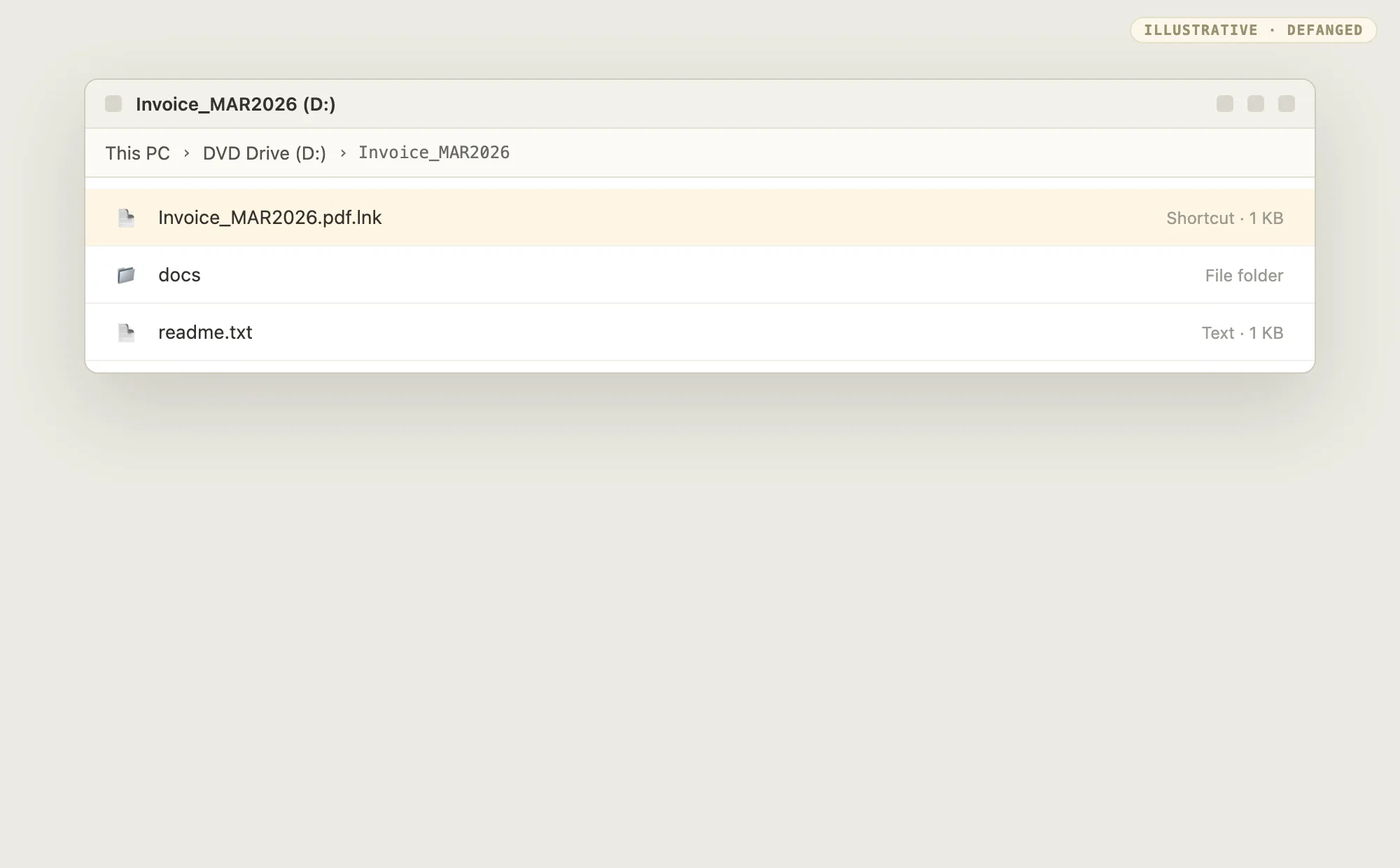
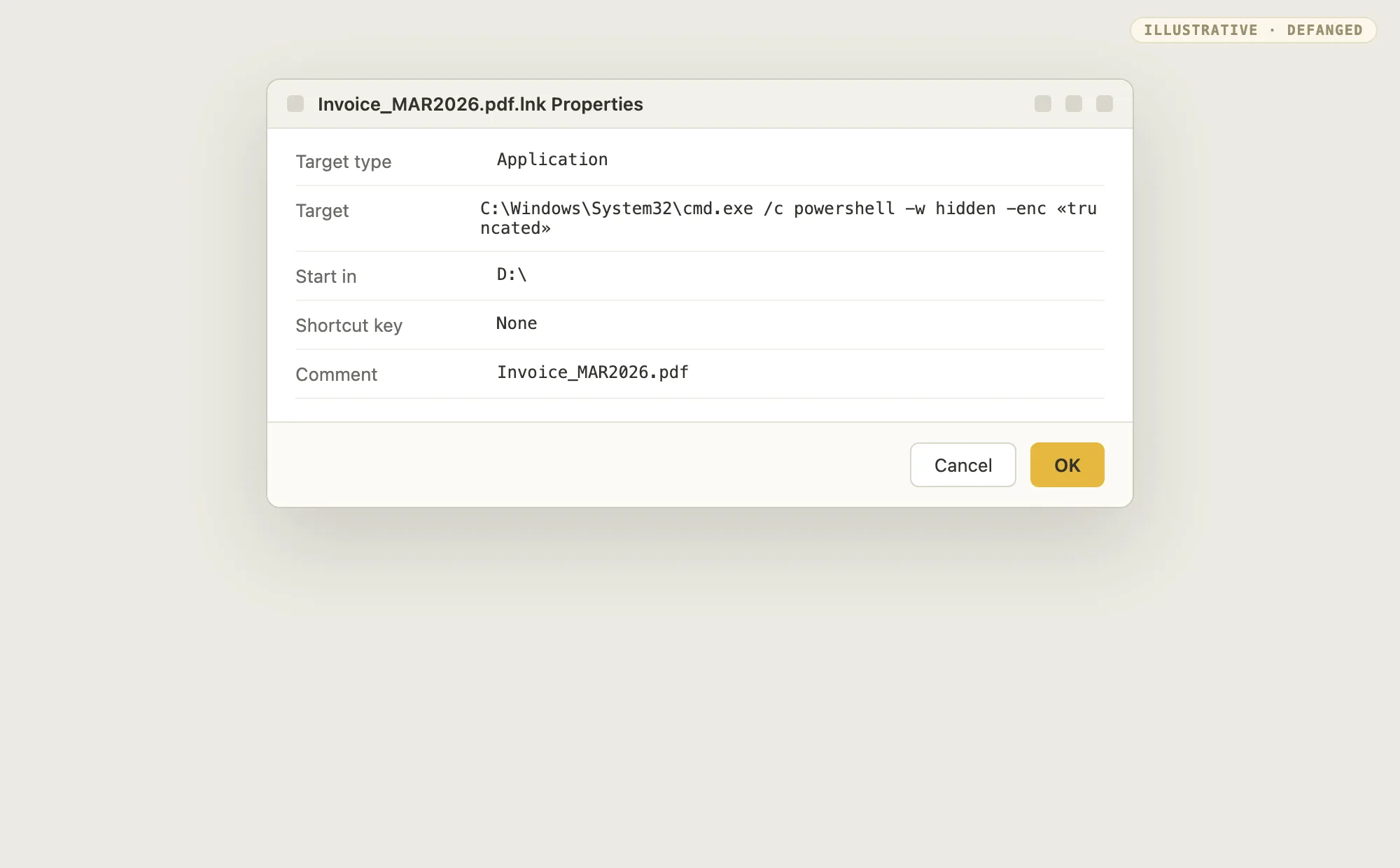
- The victim double-clicks the shortcut. Its target is not a document but a
living-off-the-land binary such as
cmd.exe, PowerShell,wscript, ormshta, and its command-line arguments carry the malicious command. The window state is set to stay hidden or minimized. - The command stages the real payload: a signed binary that sideloads a malicious DLL sitting next to it, or a download cradle that fetches the next stage from the network. From here the chain looks like any other LOLBin execution, which is the point.
The shortcut format makes all of step 4 inspectable without running
anything. Microsoft specifies the layout publicly as
MS-SHLLINK:
a fixed header with link flags, then optional sections in a strict order,
name, relative path, working directory, command-line arguments, icon
location. The COMMAND_LINE_ARGUMENTS structure is only bounded by the
format when the HasArguments flag is set, which is why a weaponized
shortcut can carry an entire encoded PowerShell stanza where a benign one
holds a short path.
Why gateways miss it
The bypass rests on how Windows marks internet files. Downloads from
untrusted zones get a hidden NTFS alternate data stream called
Zone.Identifier with a ZoneId=3 value, and that Mark of the Web is what
puts Office documents in Protected View and routes executables through
SmartScreen. Container formats such as .iso and .vhd do not support NTFS
streams, so the mark sits on the downloaded image while the files within
carry nothing, and mounting the image presents them as local files
(T1553.005).
For a long stretch this was worse than a format quirk. Windows failed to propagate the mark from a downloaded ISO to its contents for non-Office file types such as shortcuts, so double-clicking the enclosed LNK ran with no security warning at all. Microsoft fixed that propagation bug in the November 2022 Patch Tuesday release for CVE-2022-41091, after which the mark flows from the ISO to everything inside it (propagation fix).
Attackers adopted the wrapper at scale while the window was open. After Microsoft moved to block macros by default, Proofpoint measured macro use falling by roughly two-thirds between October 2021 and June 2022 while campaigns using container files plus shortcuts rose nearly 175 percent, ISO use rose over 150 percent, and LNK use rose more than sixteen-fold (post-macro shift). The technique survives the patch on unpatched hosts, in other container formats, and wherever a user can still be talked through mounting and clicking.
Detection tells
Detection has two layers, the container and the shortcut. Work through these in order of signal quality.
- An internet-born disk image with a document lure name. An
.isoor.imgarriving by mail or download, named like an invoice or resume, is anomalous before it is even mounted. Block disk images at the mail gateway where the business allows it. - Execution from a mounted image path. A process tree rooted under a freshly mounted drive letter, especially mount followed within seconds by a shortcut launch, is the behavioral pair that survives every static evasion. Alert on it the way earlier parts alerted on browser-writes-file and Office-spawns-shell.
- A shortcut whose target is an interpreter.
cmd, PowerShell,wscript/cscript,mshta, or a signed binary paired with theHasArgumentsflag and a long or encoded argument string. Overlong arguments, leading spaces, and embedded HTTP or Base64 blobs are exactly what LNK hunting guides flag first (LNK analysis with Velociraptor). - The disguise fields. A borrowed icon location pointing at a document
handler, a double-extension name such as
.pdf.lnk, and a hidden or minimized window state. Forensic writeups call this combination the canonical malicious-shortcut signature: interpreter target, present arguments, borrowed icon, deceptive name (shell link forensic analysis). - Missing Mark of the Web where it should be. A shortcut or payload from
a mounted internet image running with no
Zone.Identifieris an anomaly, not a detail. MITRE's detection guidance for this sub-technique centers on correlating container extraction or mounting with later execution outside SmartScreen or Protected View (T1553.005).
Parse every suspect shortcut statically, never by double-clicking. Eric
Zimmerman's LECmd dumps creation and access dates, target paths, and
arguments from the file bytes, recovering the attacker's command even when
the original payload is gone
(LECmd walkthrough).
Step through the chain and watch a mounted image become execution:
An ISO + LNK chain, end to end
Invoice_MAR2026.isoPick a pattern below, see how it lands, then reveal the tell and the detection.
ISO / IMG / VHD + shortcut
How it lands. A disk image arrives with a lure name and mounts as a local drive. Inside sits a shortcut targeting a shell or script host with hidden payloads beside it. One double-click runs the arguments as a trusted local launch.
What to do about it
The fix follows the tell. Treat disk images from mail and the web as guilty until proven otherwise: block them at the gateway where you can, and where you cannot, detonate them and watch for the mount-then-execute pair. Parse every delivered shortcut before it runs, reading target, arguments, working directory, and icon the way the format specifies. Patch for the 2022 propagation fix everywhere, and still assume unpatched-equivalent behavior from containers your controls do not unwrap. Users will always be able to mount and click, so the backstop is instrumentation that sees the mount, the shortcut launch, and the child process as one chain.
Does the November 2022 patch kill this technique?
Partly. On patched hosts the Mark of the Web flows from the ISO into its contents, so the shortcut launch gets evaluated instead of silently trusted. But unpatched hosts, other container formats, and users who click through warnings keep the chain alive, which is why gateway blocking and mount-then-execute detection still matter.
Why not just block every shortcut attachment?
Because the shape alone is not the verdict. Administrators ship legitimate shortcuts in installers and shared folders. Block disk images and lone shortcuts from untrusted senders where the business allows it, and everywhere else judge the shortcut by its target, its arguments, and its disguise, not by its extension.
Is a password-protected ZIP a problem on its own?
Not by itself, but it is the standard wrapper for this chain because it defeats content scanning and forces the victim to extract the payload themselves. Treat an unsolicited password-protected archive as a strong signal, and never let it reach an endpoint without unwrapping it first.
Test yourself
A quick self-check on LNK and ISO smuggling. Pick an option to see the answer.
1. Why did the shortcut inside a mounted ISO run with no warning on unpatched hosts?
2. Which shortcut field carries the attacker's command?
3. A shortcut looks like Invoice.pdf but its target is cmd.exe. What is the giveaway?
4. Which detection survives every static evasion of this chain?
What to remember
- The container is the bypass: image formats cannot carry Mark of the Web, so the inner files present as trusted local content.
- The shortcut is the trigger: a document name and icon over an interpreter target whose arguments are the payload.
- The signal that survives is behavioral: a fresh mount followed seconds later by an execution rooted under the new drive.
Explore next:
- Document macros and PDF URL actions — the earlier deep dives in this series.
- HTML as an attack surface — the file type that is also a program.
- File attack field guide, part 1 — the full taxonomy this series builds on.
Closing the series
Five parts, one thesis: files turn trust into execution, and detection has to watch what happens after the open. The arc in reading order:
- Part 1, How File-Based Attacks Land: A Detection Engineer's Field Guide, mapped the families and why filename blocking keeps failing.
- Part 2, HTML as an attack surface, opened the file type that is also a program: smuggling, phishing, QR handoffs, callbacks, and prompt injection.
- Part 3, Document macros,
hid code in
vbaProject.binand keyed on auto-exec entry points, remote templates, XLM, and DDE. - Part 4, PDF URL actions, audited the dictionary keys that turn opening a document into a click.
- Part 5 covered the containers and shortcuts that mount and execute.
Start from the series index (/blog/series/file-attack-deep-dives) for the
full set. If this finale leaves you with one habit, let it be this: read
the arguments before the icon, and treat every mounted image as
internet-born until its mark says otherwise.
Useful references:
- Subvert Trust Controls: Mark-of-the-Web Bypass, T1553.005
- Microsoft fixes Mark of the Web propagation in ISOs, CVE-2022-41091
- QBot campaigns abusing ISO images with shortcuts and DLLs
- How threat actors adapted to a post-macro world
- Why ISO: Mark-of-the-Web explained, Red Canary
- [MS-SHLLINK]: Shell Link Binary File Format
- Shell link forensic analysis: LNK targets, arguments, and disguise
- Finding the LNK: analysis methodology with Velociraptor
- LNK forensics walkthrough with LECmd